
How to Get Your Business on ChatGPT: Business Hub Guide

Kaiyan Ali
Founder at Montaj Digital

Kaiyan Ali
Founder at Montaj Digital
I'm Kaiyan, founder of Montaj Digital. I help professional service firms put AI and automation to work, so their people spend less time on admin and more on the work only humans can do. I've trained 250+ professionals at our AI Week, and I'm on a mission to help a million service firms do the same.
Follow me for more contentUntil this week, you had no say in how ChatGPT described your business. It pieced you together from your website, your reviews and whatever else it could find, and you found out what it said by asking it. On 10 November OpenAI changed that with Business Hub, a free way to claim your business inside ChatGPT, keep the details right and see how often you come up.
OpenAI says 1.2 billion people use ChatGPT every week. Plenty of them are asking it which accountant, recruiter or consultant to call. So we set up Montaj Digital's profile on launch day, read the help guides, the terms and the agent policy, and went through the early write-ups from people testing it.
This is what we found: what it is, how to get your business on it, what the numbers really measure and the parts of the terms worth reading before you click continue.
What is Businesses in ChatGPT (and is it the same as ChatGPT Business)?
Businesses in ChatGPT is OpenAI's name for a set of tools that let a company manage how it appears in ChatGPT. It launched in beta on 10 November 2026 and has two parts:
- Business Hub. Where you claim your business, update its details and see insights. You can edit your website, description, category, logo, delivery and returns policies and a cover photo. If you sell products, you can connect a product feed with prices and stock.
- Business Agent. A chat assistant built from your business information. When ChatGPT mentions you, a customer can open your profile and start a separate, labelled conversation with your agent.
When ChatGPT names a business in an answer, people can now click through to that business's profile. It shows your details, a link to your website and, once you've passed identity checks, a blue tick.
If you've ever set up a Google Business Profile, this will feel familiar. It's ChatGPT's version of the same idea: a verified business profile you control, with some basic numbers on how people find you. The difference is that on Google you're one of ten blue links, while in ChatGPT you're either named in the answer or you aren't.
It isn't the same as ChatGPT Business. That's the paid team subscription (it used to be called ChatGPT Team), which gives your staff a shared, secure workspace. Business Hub is a free public listing for your customers. Paying for one does nothing for the other, and the setup screens offer you both, so it's an easy thing to mix up.
Can UK businesses get on ChatGPT?
Yes, with limits. OpenAI says any eligible business located where ChatGPT is available can claim its business, depending on its location and type. We're a UK company and created a profile for Montaj Digital on launch day.
What UK businesses can't do yet:
- Business Agents. These are limited to eligible ecommerce and online service businesses in the US with a website.
- Local listings. Shops and restaurants can currently only claim an existing US listing, so a UK high-street business may not be able to add itself.
- Product feeds outside the US. Early testers report that the standard feed upload targets the US, and other markets need OpenAI to confirm the setup.
OpenAI says it will expand to more countries and business types. It hasn't said when.
How to get your business on ChatGPT, step by step
- Go to chatgpt.com/business-hub, or open Business Hub from the ChatGPT sidebar, and search for your business by name. If you're an eligible online business and you're not listed, you may be offered the option to add it.
- Pick your category and write a short description of what you do.
- Verify that you're connected to the business. The options include a code by text or automated call to your business phone, a code to your business email, a TXT record on your website's DNS, or logging in to your Shopify store.
- Wait for OpenAI to review the claim. The decision, or a request for more information, comes by email. Until then the profile sits as a draft.
- Complete identity verification with Persona, OpenAI's verification partner. You may need a government-issued ID, your company registration details and proof that you can represent the business.
Don't skip the last step. Until Persona approves you, you can't publish changes, see insights or build an agent, and you don't get the blue tick. Submitting your documents isn't the same as being approved. Make sure your business name, address and company number match Companies House exactly, because a mismatch is the most common reason the check fails.
Take your time over the description too. When you create a new profile, Persona approval publishes it automatically, and after that OpenAI Support can't delete, unpublish or hide it. Only drafts can be deleted.
Key takeaway: Use whichever verification method your team can do fastest. If someone else looks after your domain, the DNS route means waiting on them, so the business email or phone code is usually quicker.
What we found setting ours up
Getting to a draft profile took a few minutes. A few things stood out.
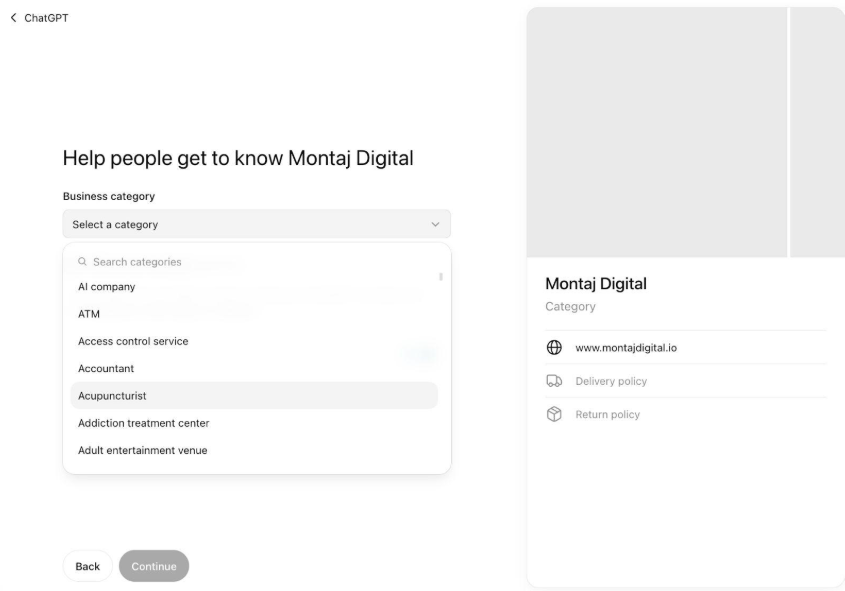
It was built for shops first. Our profile preview asked for a delivery policy and a returns policy, which a consultancy doesn't have. Early write-ups say a 'service' business type is marked as coming soon. If you sell a service, leave those fields empty rather than inventing something to fill them.
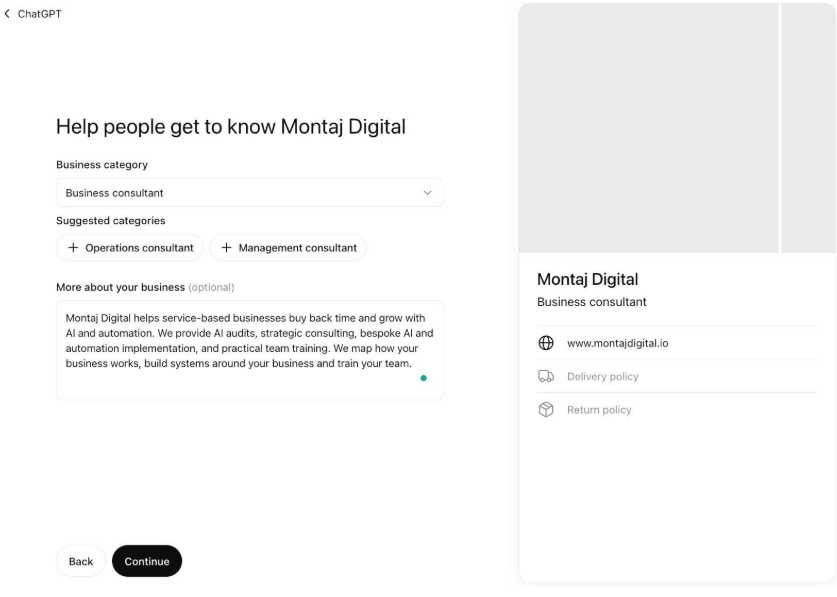
The description box is optional. Fill it in anyway. Write it as a plain brief, not a sales line: what you do, who for, where, and what makes you different. Ours says Montaj helps service-based businesses buy back time and grow with AI and automation, through AI audits, consulting, implementation and team training. Use the same words your homepage uses.
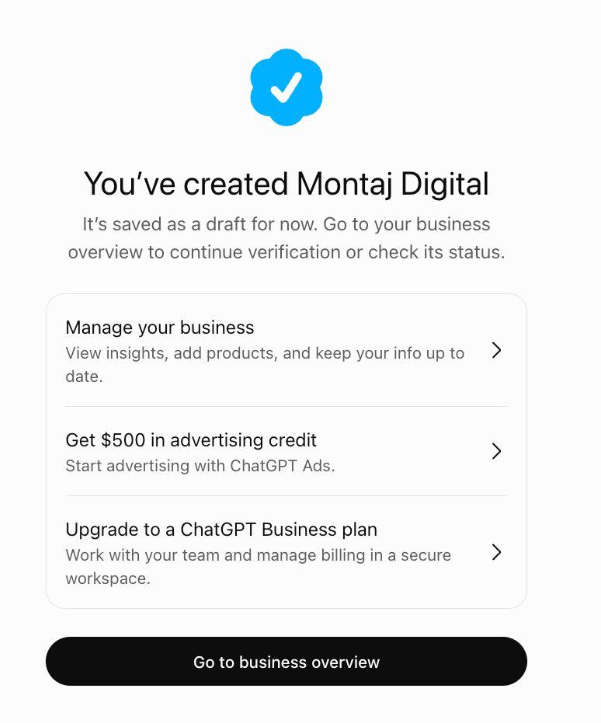
The upsells come early. Once the draft was saved, ChatGPT offered us $500 of advertising credit and an upgrade to a ChatGPT Business plan. Neither is needed to claim your profile.
Read the terms before you click continue
The Business Hub page says that by continuing you accept OpenAI's Businesses in ChatGPT Terms. Searching for your business counts. Most people won't read them, so here are the parts we think business owners should know about. This isn't legal advice, and if anything here worries you, ask your solicitor.
- OpenAI can list you anyway. It can create and display a listing whether or not you claim it, and it can add to, edit or replace your information from other sources. Claiming gives you a say, not control.
- Your basic details are licensed for good. Your name, address, contact details, category, opening hours and website are covered by a perpetual, irrevocable licence once you submit them for display.
- ChatGPT may phone you. The terms say OpenAI's AI assistant may make calls to your business on behalf of its users. There's an opt-out link in the terms.
- There's a wide 'covenant not to sue'. You agree not to bring certain claims against OpenAI about the data you provide and content published on your websites.
- Product feeds come with conditions. If you add a feed, you must let OpenAI's crawlers access your site and give up any text and data mining opt-out you've set against OpenAI.
- Your insights are confidential. You can use the data to measure and report on your own performance, but you can't publish or share it beyond the people helping you.
None of this is a reason to stay off. OpenAI can list you whether you claim or not, so you're usually better off with accurate details. Just know what you've agreed to.
What does a ChatGPT Business Agent do?
A Business Agent answers customer questions from the information you give it: your products, prices, policies and instructions on how to answer. OpenAI's example is a shopper comparing two products and asking which fits their needs. You test it with real customer questions, then publish it.
It can't take payments, make bookings or look up orders. It explains things and links to your website. OpenAI's Business Agents Policy also sets clear rules: the agent must say it's AI, can't pretend to be human or an independent adviser, can't invent prices, reviews or results, and can't pressure people or keep pushing after someone says no. It also can't give advice that legally needs a professional licence, which matters for accountants, lawyers and financial advisers.
For now agents are only open to eligible US ecommerce and online service businesses. If you're in the UK, claim your profile now and expect agents later.
What do the Business Hub insights actually measure?
Once you're verified, Business Hub shows three numbers over the last 28 days:
- Mentions. For an online business, a mention counts only when ChatGPT references your website. Your name on its own doesn't count, so this number will usually be lower than how often ChatGPT really talks about you.
- Website clicks. Clicks through to your site, recorded inside ChatGPT. A click isn't a confirmed visit or a sale.
- Discovery topics. The themes in ChatGPT answers that mentioned or cited you.
OpenAI also mentioned profile views when it launched, but its help guide doesn't yet explain how they're counted, so treat that number with care until it does.
You won't see the questions people asked, the conversations themselves or how you compare with competitors, and there's no export. Small businesses may see blank numbers for a while. OpenAI says blank means you haven't reached the reporting threshold yet, not that nobody has seen you.
So don't rely on the Hub alone. Links from ChatGPT usually carry utm_source=chatgpt.com, so set up a view in GA4 for that source today. Then write down ten questions your buyers would ask ChatGPT, run them once a month and note who it names. Answers change from one run to the next, so look for the trend, not one result.
Will claiming your business help you rank in ChatGPT?
No. OpenAI is clear that claiming doesn't guarantee more visibility or give you control over ChatGPT's own recommendations, and that advertising doesn't influence them either. The terms say the same: no guaranteed placement, ranking or traffic.
What the profile does is keep the facts right. What gets you recommended is the same work as before: a website that says clearly what you do and who for, reviews from real clients, and content that answers the questions your buyers ask. If your profile, your website and your Google listing all say slightly different things, you're making it harder for ChatGPT to describe you.
There's also a technical check that takes two minutes. Open yourdomain.com/robots.txt and make sure it doesn't block OAI-SearchBot, the crawler OpenAI uses for ChatGPT search. OpenAI's own documentation says sites that block it won't be shown in ChatGPT search answers, and changes take about 24 hours to apply. GPTBot is separate: blocking it opts you out of training, not search. I checked ours: it allows everything.
What about ChatGPT Ads?
Business Hub sits alongside ChatGPT Ads. Businesses can sponsor their agent and use it as the destination for an ad, and sponsored placements are labelled separately from ChatGPT's answers. That's why the setup offered us $500 in credit.
We haven't tested ChatGPT Ads, and the agent side isn't open to UK businesses yet, so we're not recommending spend on it. If you do try it, treat it like any new ad channel: a small budget, a clear landing page and conversion tracking set up before you start.
Where to start
- Search for your business at chatgpt.com/business-hub and claim it before someone else does. If a competitor, former employee or old agency already has, use 'Dispute ownership' from the menu on the profile.
- Decide who owns it. One person holds the admin login and can add teammates or an agency afterwards, each with their own ChatGPT account.
- Get your documents ready for Persona: a director's ID and your company details, matching Companies House exactly.
- Write your description and pick your category carefully. Use the words your homepage uses, and fix the homepage if it doesn't say clearly what you do.
- Check your robots.txt allows OAI-SearchBot.
- Set up a GA4 view for traffic from chatgpt.com and run your ten buyer questions.
- Once verified, note your first 28 days of insights and check them each month.
Businesses in ChatGPT is a beta, and a lot of it will change: agents will reach more countries, the insights will improve and the ads will grow. The first step is free, takes a few minutes and means you have a say in how ChatGPT describes your business. I'd do it this week.
It's also a good prompt to look at the bigger picture. If buyers are asking AI who to call, the businesses that get named are the ones with clear websites, real reviews and content that answers real questions. For the tools we use to do that work, see the AI toolkit: what to use and when.
If you'd like help working out where AI fits in your business, from how buyers find you to the work your team repeats every week, book an AI audit. We'll map what you do today and show you where the time is going.
Got any questions? We have the answers.
If your question isn't answered here, book a free AI discovery call and we'll talk it through.
In many ways, yes. Both let you claim and verify your business, control your basic details and see some numbers on how people find you. The difference is how you show up. Google lists many results, while ChatGPT usually names a handful of businesses in one answer, and claiming your profile doesn't change which ones it picks.


Learn with our resources
Stay informed with Our Latest InSights

Scroll-Stopping Proposals: How to Turn a Sales Call Into an Interactive Web Page With AI
PDF proposals get skimmed. A proposal built as a web page gives the buyer a clear path through the decision, with calculators, video and a booking button built in. Here's the five-step workflow for turning a sales call into a branded, interactive proposal with AI, then publishing it on your own domain.
Read more
Build your AI second brain: stop starting from scratch with AI
Most businesses still use AI like a scratchpad: open a new chat, explain the business again, get an answer, then start from scratch next time. This replay shows how to build a portable context layer from source files, reviewed knowledge, an index and a log, so AI can work from what your business already knows.
Read more
AI implementation for service businesses: start with process, not tools
Most AI projects don't fail because the model is weak. They fail because the business hasn't mapped the process, centralised the context or decided where human judgement belongs. Here's the practical implementation model I use with service businesses.
Read more
Why Your Paid Ads Aren't Working: 5 Reasons They Fail for Financial Services Firms
If you've run paid ads for your financial services firm and they didn't land, the ads probably weren't the problem. Most agencies treat a firm closing £20k to £100k engagements like an e-commerce brand selling a £50 product, so they target the wrong way, send traffic to the wrong place, and report on numbers that don't matter. Here are the five reasons paid ads fail for regulated, high-ticket firms, and the fix for each: your creative is now your targeting, cold traffic needs a lead capture not a homepage, follow-up has to happen in minutes, a safe offer is an invisible one, and vanity metrics hide where your system is actually breaking.
Read more
How to Map Your AI & Automation Workflows
You can't automate a bad workflow. AI is only as good as the process you point it at, so the work that pays off happens before you touch a single tool: mapping what actually happens, step by step. This piece walks through how we do it, systems thinking over task thinking, the five whys to find the real cause of a broken process, six simple blocks for drawing any workflow, and a way to decide which tasks AI should run, assist with, or stay out of.
Read more
Why AI Isn't Optional Anymore: How to Stand Out in a World of AI
AI is not coming; it is already here, and it is already replacing tasks inside your job rather than the job itself. The wrong question is “will AI take my job?”. The right one is “which parts of my work are easy to replace, and how do I make myself valuable around them?”. Here is what still makes you stand out, and five frameworks to future-proof your work.
Read more